 A little help here...
Hmmm... lets try this...
Nope, not working the way I expect it to.
This is what I copied and pasted from the FAQ when doing a search on pictures. I get stuck on this part - I have a manage attachments where I see the file uploaded to the post/reply to thread, and the file is there. But no arrow to click on to attach the image to the reply the way I see in other posts. Wait, lets see if this works.
new-york-map-04.jpg
How do I add an image to a post?
If you have uploaded an image as an attachment, you can click the arrow next to the 'Attachment Icon' and select it from the list. This will be inserted into your post and can be located where you want it displayed.
OK, I got it now.
Anyone who thinks CDs sound better needs to listen to my system. Besides, my cables sound better than yours.
Technics SL1200-MK2 SE-1: MN Bearing + Baseplate + AL/CU Platter, Paul Hynes SR7 Power Supply, Isonoe Feet, SME V, Audio Technica AT33EV, CableMaker 1 Tonearm Cable
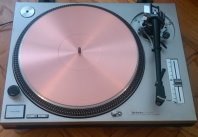
Technics SL1200-MK2 SE-2: MN Bearing + Baseplate, Copper Mat, Paul Hynes SR7 Power Supply, Isonoe Feet, SME 309, Audio Technica ATOC9/MLII, CableMaker 1 Tonearm Cable





 Reply With Quote