Barry
I can't get to the point where the Postimage site asks me to upload another image. I can open my gallery, but that message doesn't appear. Any clues?

 Senior Member

Location: Meriden, UK
Posts: 348
I'm Phil.

Barry
I can't get to the point where the Postimage site asks me to upload another image. I can open my gallery, but that message doesn't appear. Any clues?
 Drunken Administrator
Location: Staffordshire, England
Posts: 43,349
I'm Martin.
go to Postimage site, first screen you see is this one:
Click on 'choose image' this will bring up the 'Pictures' folder (if using Windows, I've no idea about any other O/S)
You don't need to create an account or make a gallery. That just overcomplicates it. Just save your photographs in the 'Pictures' folder in Windows.
Click on the picture you want to upload
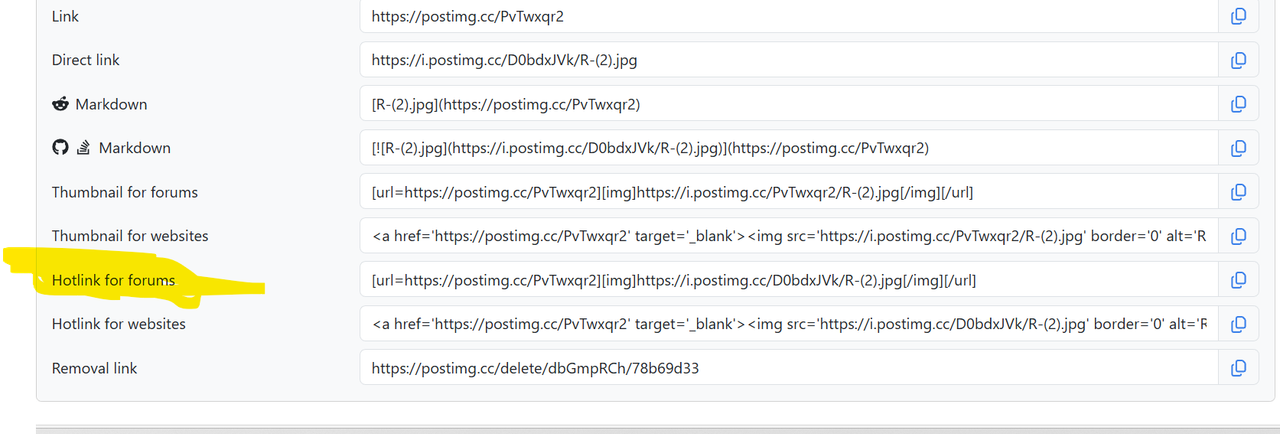
You then get this screen
Copy 'Hotlink for forums' and paste it into your post.
Current Lash Up:
TEAC VRDS 701T > Sony TAE1000ESD > Krell KSA50S > Troels Gravesen Faital 3WC-15.
 Fount Master & Administrator
Location: Essex
Posts: 37,721
I'm openingabottleofwine.
Senior Member
Location: Meriden, UK
Posts: 348
I'm Phil.
Brilliant - thanks, Barry. Just successfully edited my "For sale" post.
 Posting Permissions
 Reply With Quote